If you're coming from SEO, the word "keyword" means one thing: the search query you want to rank for. In AI visibility monitoring, that mental model will steer you wrong. Prompts and keywords are two distinct concepts, and understanding the difference is the foundation of everything else you'll do in AI Sightline.
Here's the short version: prompts are the questions you ask AI platforms. Keywords are the brands, products, and topics you track in the answers. They work together to give you a two-dimensional view of your AI visibility that no single metric can capture alone.
Why Traditional Keyword Tracking Breaks Down in AI Search
In traditional SEO, you pick a keyword like "best CRM for small business," optimize a page for it, and track where you rank in Google's results. One dimension: query in, rank out.
AI search doesn't work that way. When someone asks ChatGPT "what's the best CRM for small business," the response isn't a list of 10 blue links. It's a generated paragraph that might mention three brands by name, link to two sources, and skip your brand entirely. There's no "rank #4" to track. There's either mentioned or not mentioned, cited or not cited, recommended or ignored.
That's why AI visibility monitoring needs two dimensions: what questions are being asked (prompts), and who's getting mentioned in the answers (keywords). Tracking one without the other gives you an incomplete picture.
What Are Prompts in AI Sightline?
A prompt is a question or query that you want to monitor across AI platforms. It's the input -- the thing a real user would type into ChatGPT, Perplexity, Claude, Gemini, Google AI Mode, or Microsoft Copilot.
Think of prompts as the conversations you want to eavesdrop on. If you sell project management software, your prompts might include:
-
"What's the best project management tool for remote teams?"
-
"Asana vs Monday.com vs alternatives"
-
"How do I manage a software development project?"
-
"What tools do startups use for project tracking?"
Each prompt represents a real question your potential customers are asking AI platforms. When AI Sightline scans a prompt, it sends that exact question to each AI platform in your plan and captures the full response.
How prompts work in AI Sightline
Every prompt you add gets automatically scanned on a rolling cycle. Pro, Business, and Agency plans scan daily. Starter plans scan every 3 days. Free plans scan every 7 days. There's no manual scanning to manage -- every prompt in your account gets scanned across all your platforms on that cadence, automatically.
The number of prompts you can monitor depends on your plan: 3 on Free, 20 on Starter, 75 on Pro, 200 on Business, and 400 on Enterprise. Prompts are the primary scaling lever in AI Sightline because they determine the breadth of conversations you're monitoring.
Choosing good prompts
The best prompts mirror how real people actually talk to AI. They're conversational, specific, and represent genuine purchase or research intent. "Best CRM software 2026" is a fine keyword for Google, but real people ask ChatGPT things like "I run a 15-person agency and need a CRM that integrates with Slack -- what should I look at?"
AI Sightline's prompt suggestion engine can help here. Based on your brand profile and existing keywords, it generates prompt ideas calibrated to how people actually query AI platforms.
What Are Keywords in AI Sightline?
A keyword is a brand, product, topic, or entity that you want to track across all your prompt responses. It's what you're looking for in the AI's answers.
Keywords answer a different question than prompts. Prompts ask "what conversations are happening?" Keywords ask "who's getting mentioned in those conversations?"
If you're Salesforce, your keywords might include:
-
"Salesforce" (your own brand)
-
"HubSpot" (a competitor)
-
"Zoho CRM" (another competitor)
-
"Pipedrive" (another competitor)
-
"CRM integration" (a topic you want to own)
When AI Sightline scans a prompt and gets a response from, say, ChatGPT, it checks that response for every keyword in your account. Did ChatGPT mention Salesforce? Did it mention HubSpot? Was "CRM integration" discussed in the context of your brand or a competitor's?
How keywords work in AI Sightline
Keywords are tracked across every prompt scan automatically. You don't assign keywords to specific prompts -- every keyword is checked against every response from every platform. This cross-referencing is what makes the two-dimensional model powerful.
Your keyword limit scales with your plan: 10 on Free, 25 on Starter, 100 on Pro, 300 on Business, and 750 on Enterprise. The Keywords management page lets you add keywords individually, import them via CSV, or use the AI suggestion engine to discover keywords you might be missing.
Choosing good keywords
Start with your own brand name and product names. Then add your top 3-5 competitors. Then layer in the topical terms that matter to your category -- the concepts you want AI platforms to associate with your brand.
A common mistake is adding generic keywords that are too broad. "Software" will match in nearly every AI response and won't tell you anything useful. "Project management software for remote teams" is specific enough to generate meaningful signal.
How Prompts and Keywords Work Together
Here's where the two-dimensional model clicks. Imagine you've set up 20 prompts and 25 keywords on a Starter plan. Every scan cycle, AI Sightline:
-
Sends each of your 20 prompts to each AI platform
-
Captures the full response from every platform
-
Checks every response for all 25 of your keywords
-
Records which keywords appeared, in what context, with what sentiment
That's 20 prompts x 5 platforms x 25 keywords = 2,500 data points per scan cycle. Each data point tells you: "When [platform] was asked [prompt], did it mention [keyword]?"
This matrix is what makes AI visibility monitoring fundamentally different from SEO rank tracking. You're not watching a single position on a single search engine. You're watching a web of conversations across multiple AI platforms, tracking who gets mentioned and who gets left out.
A concrete example
Say you're a SaaS company that sells email marketing software. You add three prompts:
-
"What's the best email marketing tool for ecommerce?"
-
"Mailchimp alternatives for small business"
-
"How do I set up automated email sequences?"
And five keywords: your brand, Mailchimp, Klaviyo, ConvertKit, and "email automation."
After a scan, you might discover:
-
ChatGPT mentions your brand for the first prompt but not the second
-
Perplexity mentions Klaviyo for all three prompts but never mentions you
-
Google AI Mode mentions you for the third prompt but recommends Mailchimp first
-
Claude doesn't mention your brand for any prompt
That's not a single "rank" number. That's a visibility map showing exactly where you're winning, where you're losing, and where specific competitors are beating you on specific platforms for specific questions. That level of detail is what lets you take targeted action.
How This Shows Up in AI Sightline's Dashboard
The two-dimensional model shapes everything you see in AI Sightline's interface. Here's how prompts and keywords surface across the key views.
Prompt Results
When you view a specific prompt's results, you see the full AI response from each platform, with your tracked keywords highlighted. This is the "zoom in" view -- one question, all platforms, all keyword matches visible at a glance.
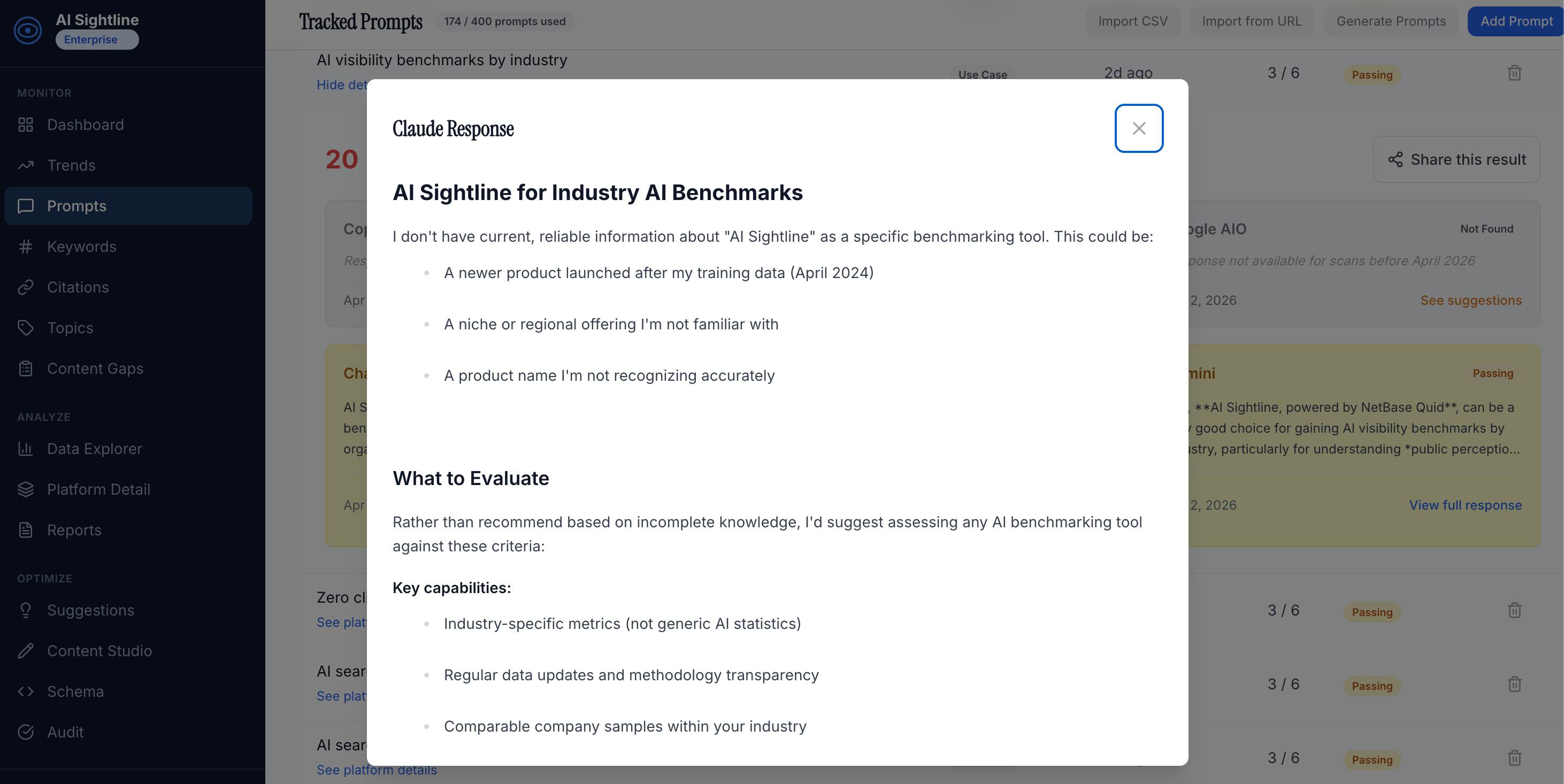
This view answers: "For this specific question, which platforms mention my brand? Which mention competitors? What exactly are they saying?"
Visibility Overview
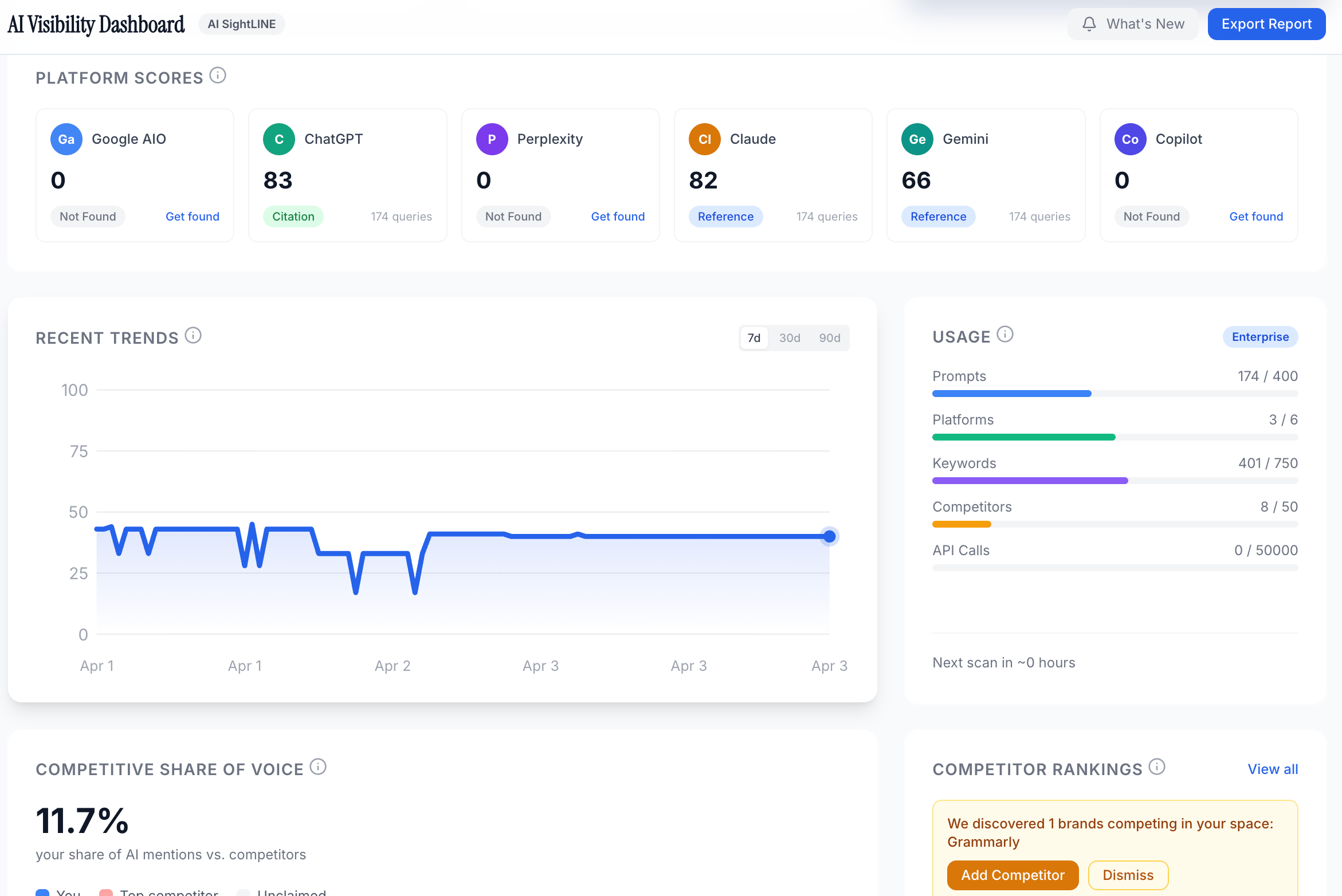
The main dashboard overview rolls up your prompt and keyword data into visibility scores. You can see your overall visibility score across all platforms, broken down by individual platform. The score reflects how often your tracked keywords (especially your brand) appear across all your monitored prompts.
Keywords Page
The dedicated Keywords page shows each keyword's performance across all your prompts and platforms. You can see at a glance which keywords appear most frequently in AI responses, which platforms favor certain keywords, and where your brand keyword stacks up against competitor keywords.
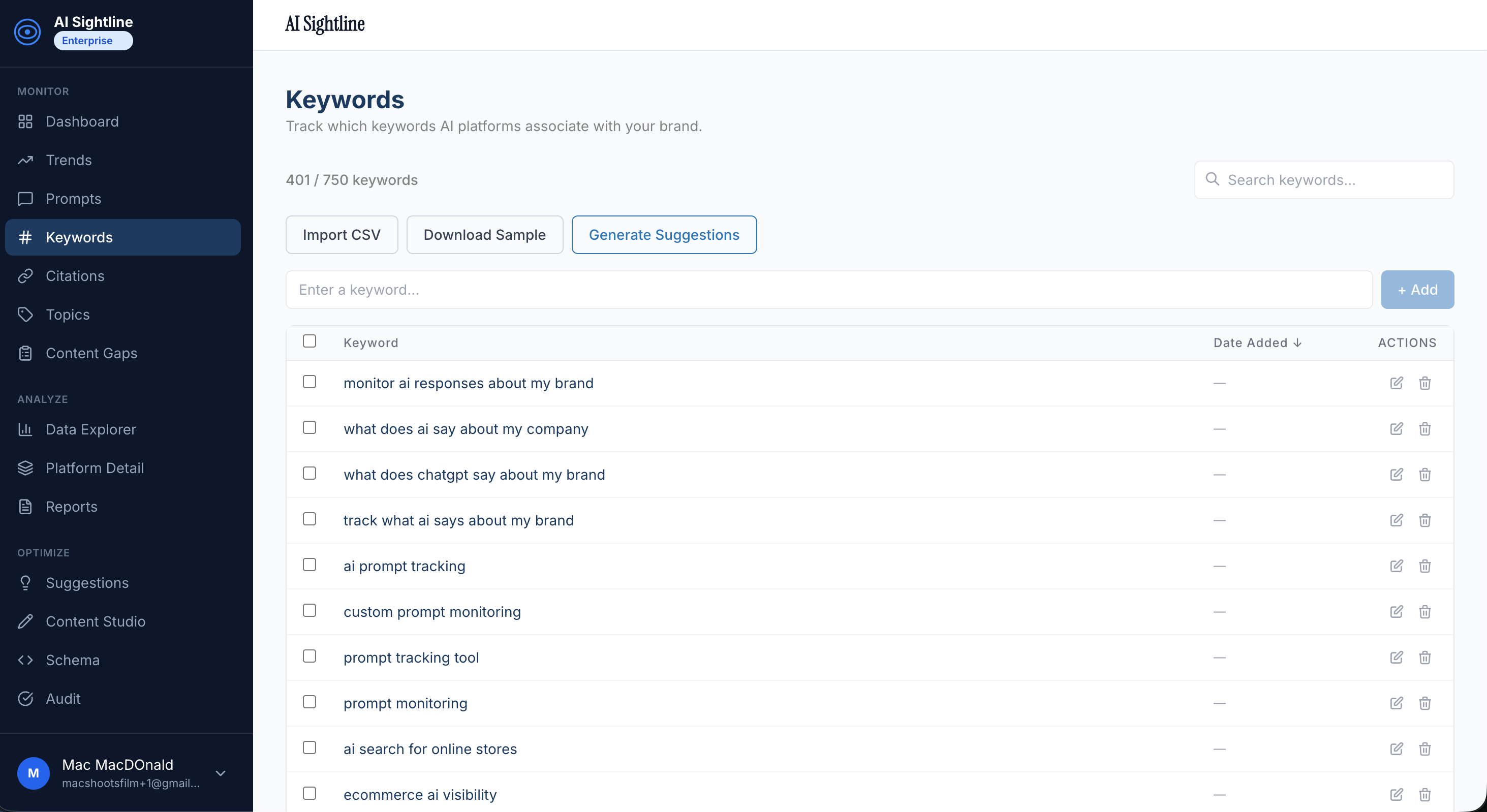
This view answers the portfolio question: "Across all the conversations I'm monitoring, who's getting mentioned the most?"
Competitive View
When you've added competitor brands as keywords, AI Sightline's competitive analysis shows head-to-head visibility comparisons. For each prompt, you can see whether the AI platform mentioned you, your competitor, both, or neither. Across all prompts, you get a share-of-voice picture: out of all the AI responses you're monitoring, what percentage mention your brand vs. competitors?
Trends Over Time
Because scans run automatically on a rolling cycle, AI Sightline tracks how your keyword mentions change over time. Did you publish a new piece of content and see your brand keyword appear in more AI responses the following week? Did a competitor launch a product and suddenly start appearing in prompts where they were previously absent? The trend data connects your actions to visibility outcomes.
The Mental Model: Think Rows and Columns
If it helps, think of it as a spreadsheet. Prompts are the rows. Keywords are the columns. Each cell is a yes/no (plus sentiment and context) for a specific platform.
| Your Brand | Competitor A | Competitor B |
|---|---|---|
| "Key Topic" | "Best [category] tool?" | Mentioned |
| Mentioned | Not mentioned | Discussed |
| "[Competitor A] alternatives" | Recommended | Mentioned |
| Mentioned | Not discussed | "How to [solve problem]?" |
| Not mentioned | Not mentioned | Not mentioned |
| Discussed | Row analysis (reading across) tells you: "For this question, who's winning?" Column analysis (reading down) tells you: "For this brand/topic, which questions trigger mentions?" | Both perspectives matter. And you can only get both when you're tracking prompts and keywords as separate, interconnected dimensions. |
Common Questions
"Aren't prompts just keywords by another name?"
No. A keyword in traditional SEO is a search query. A prompt in AI Sightline is also a query, but it serves a different purpose: it's the input you're monitoring, not the thing you're tracking in the output. Keywords in AI Sightline are the entities and terms you're watching for in AI responses. The naming reflects a genuinely different model, not jargon for its own sake.
"How many prompts and keywords do I need?"
Start with 3-5 prompts covering your highest-intent questions and 5-10 keywords covering your brand, top competitors, and key topics. You'll learn fast which prompts generate the most useful data and can expand from there. The free plan (3 prompts, 10 keywords) is enough to validate the model before upgrading.
"Can I use the same phrase as both a prompt and a keyword?"
Technically yes, but they'd serve different purposes. "Best CRM for small business" as a prompt means you're asking AI platforms that question. As a keyword, it means you're checking whether AI responses mention that exact phrase. In practice, your prompts will be longer and more conversational, while your keywords will be shorter brand names and topic phrases.
"Which matters more -- adding more prompts or more keywords?"
More prompts expands the breadth of conversations you're monitoring. More keywords expands the depth of what you're tracking in each conversation. Early on, prioritize prompts -- they determine whether you're listening to the right conversations. Once you're confident in your prompt set, add keywords to capture more competitive and topical signal.
Start With the Free Plan
The fastest way to internalize the prompts-vs-keywords model is to see it in action. AI Sightline's free plan gives you 3 prompts and 10 keywords across 3 AI platforms -- enough to set up a basic visibility map and see how the two dimensions interact in your own dashboard.
Add your brand name as a keyword, add your top competitor, pick 2-3 questions your customers ask AI, and run your first scan. The data will make the distinction click faster than any blog post can.
Start monitoring your AI visibility -- free, no credit card required.
What is the difference between prompts and keywords?
Keywords are the short, intent-signaling phrases users type into Google. Prompts are the conversational questions users ask AI assistants. "best CRM" is a keyword; "what is the best CRM for a 10-person consultancy that uses Slack" is a prompt. AI visibility tracks prompts, not keywords.
Should I still track keywords?
Yes for traditional SEO, where keywords still drive ranking and click-through. But for AI visibility you need to add prompt research alongside keyword research, because the conversational queries AI assistants answer have no clean keyword equivalent.
How do I research prompts the way I research keywords?
Three sources. First, your sales calls and support tickets (capture the actual sentences buyers say). Second, Reddit and Quora threads in your category (assistants pull from these heavily). Third, the prompt suggestion engines built into AI visibility tools like AI Sightline, which surface gap prompts where competitors appear and you do not.
How many prompts do I need to track?
For a single brand defending its category, 25 to 50 well-chosen prompts cover most buying-intent surface area. Agencies tracking multiple brands need 50 to 200 per brand depending on category breadth. AI Sightline's tier limits are calibrated against these benchmarks.
Get your free AI visibility score.
See how ChatGPT, Claude, Perplexity, Gemini, Google AIO, and Copilot talk about your brand.
Start freeSolo founder building AI visibility monitoring. Ships weekly. No venture capital, a lot of opinions about where AI search is going.