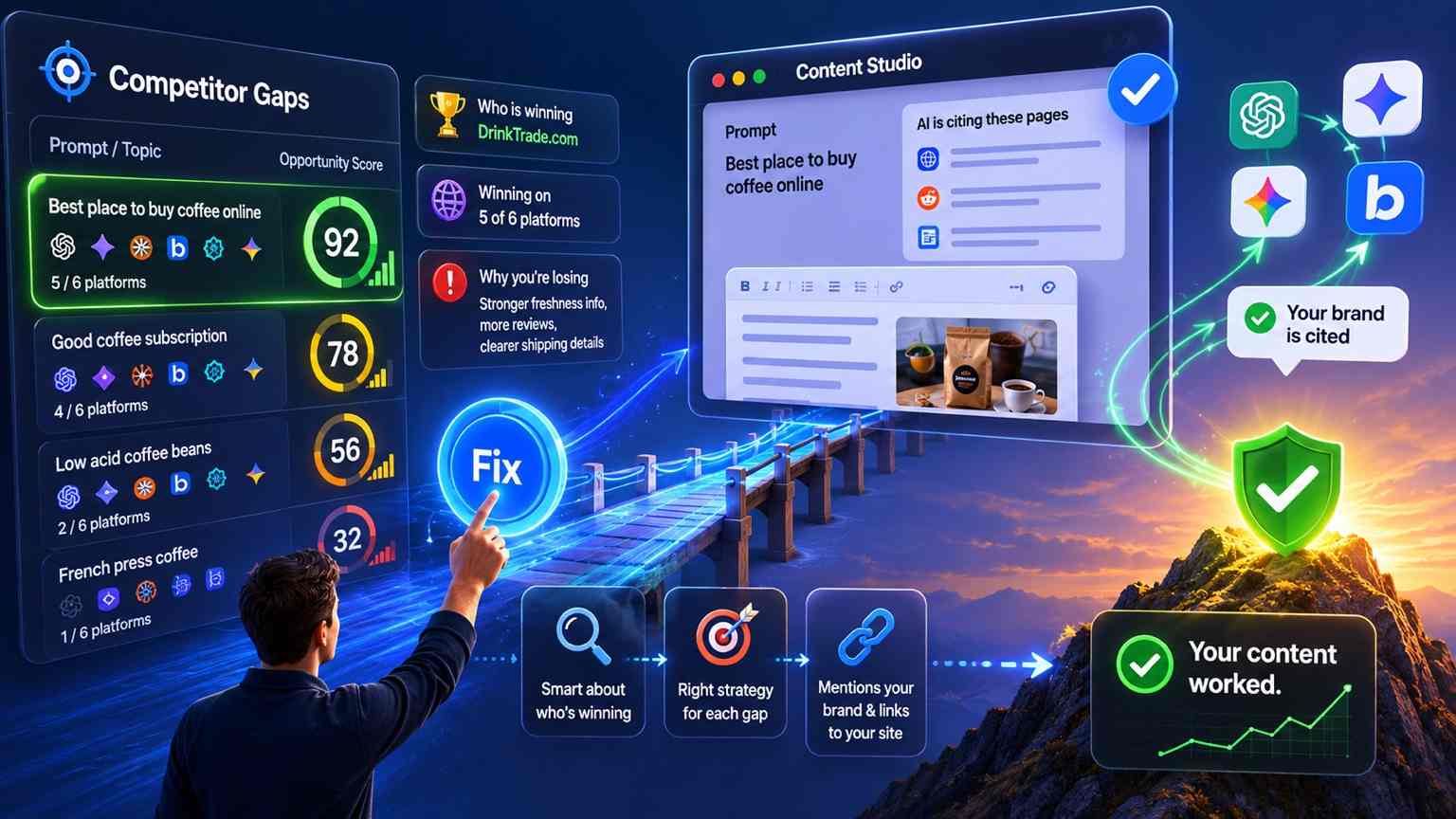
On Tuesday, May 20, one of our customer's opened a support ticket with a question we have heard, in one form or another, from almost every Business and Agency customer since we launched.
I can see I am not getting cited. I need to know who is. On every single prompt.
Seven days later, on Tuesday, May 27, that answer is live in production for every AI Sightline account, on every tier, with no setup required.
This post is two things at once. It is a tour of what shipped, because per-prompt competitor tracking is the largest single addition to AI Sightline since multi-brand support. And it is the story of how a customer ticket on a Wednesday afternoon became a feature on the next Wednesday evening, because that turnaround is the actual product promise underneath every other promise we make.
The gap in every AI visibility tool, including ours
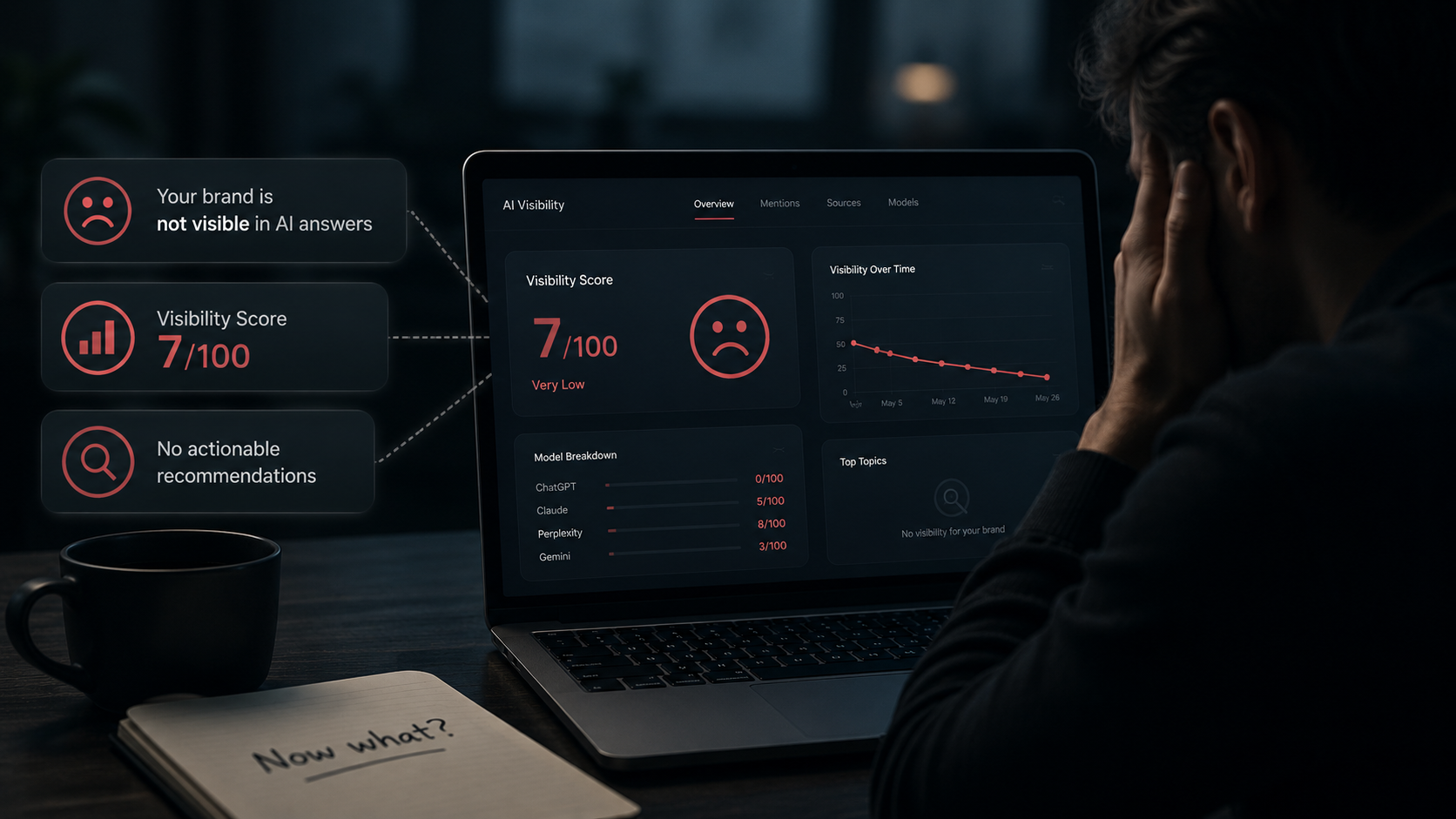
Since we went live, AI Sightline has shown you whether AI assistants mention your brand on a prompt. That is half the question. The other half, the half buyers actually care about, is who they mention instead.
When a prospective customer asks ChatGPT "what is the best EHR for solo practice," the answer cites someone. Across the six AI platforms AI Sightline tracks (Google AI Overviews, ChatGPT, Perplexity, Claude, Gemini, and Copilot), that single question typically pulls in four to ten distinct domains. On Perplexity alone, the model might cite three pages from one competitor's site while your brand is nowhere on the page.
That is the conversation happening right now, in front of your buyers, that you were not in the room for. Until today, the best AI Sightline could tell you was a number. The number told you that you were absent. It did not tell you who was present in your place.
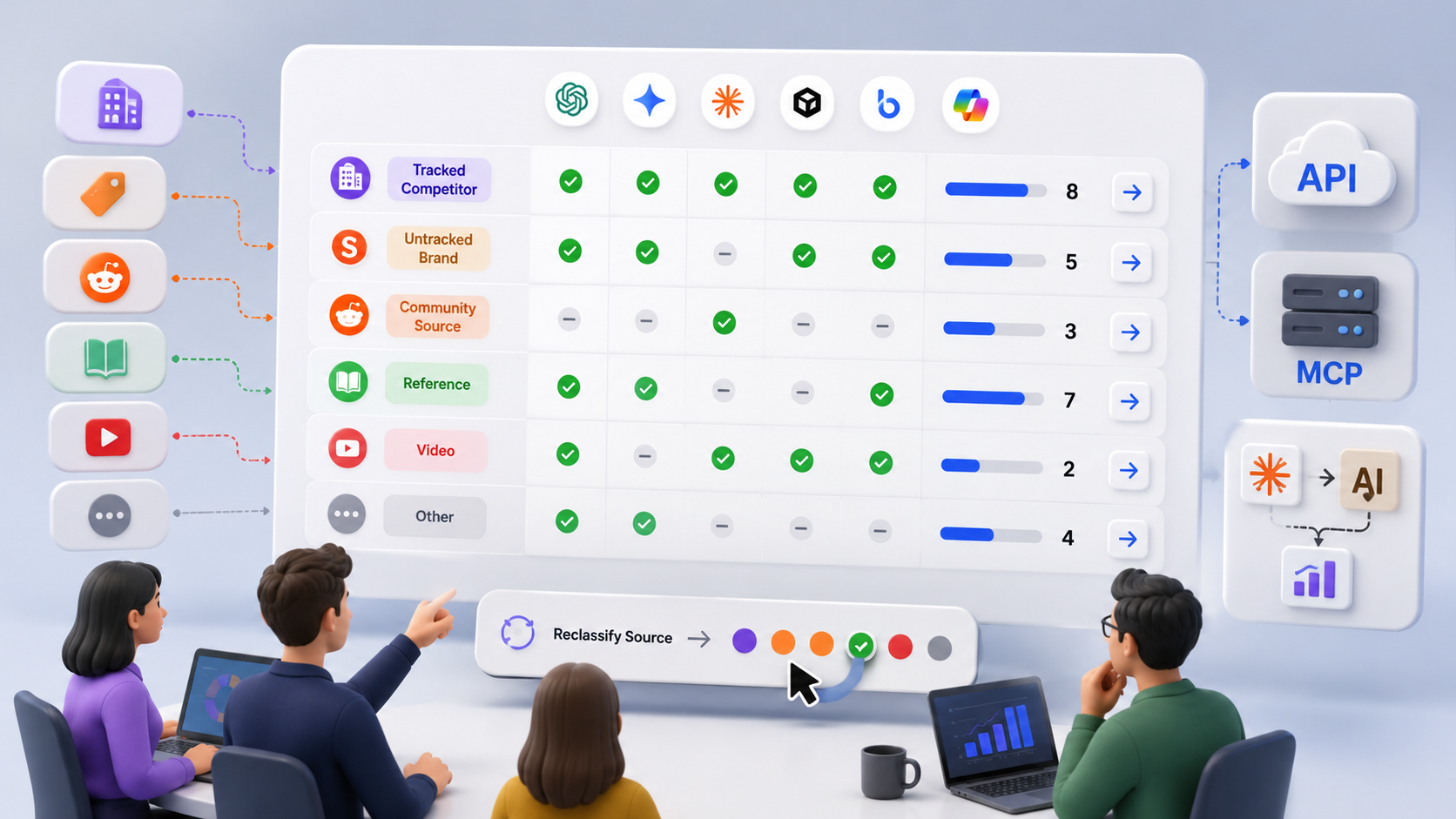
Per-prompt competitor tracking puts you in the room. Every tracked prompt now opens into a leaderboard of every cited domain (yours included, even at zero), grouped by tracked competitor, untracked brand, community source, reference, video, or other. Each row shows which AI platforms cited it, how many distinct URLs were pulled, and a one-click drilldown to the actual pages. Misclassified a competitor as a generic "Reference" source? One button fixes it. Want this data in your own dashboard or piped into a Claude workflow? The REST API and MCP server expose every byte.
It is the answer to the question our customer asked. It is also the answer to the question every Business-tier customer has asked one way or another since we shipped competitive tracking.
What is new at a glance
Six concrete additions are live as of today:
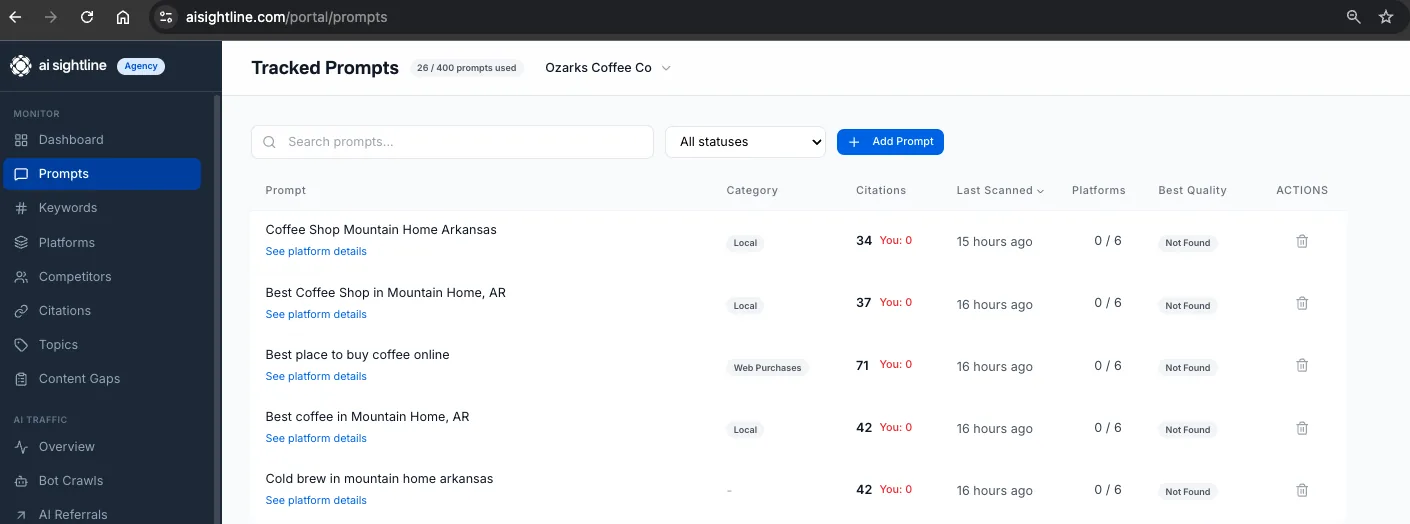
A new Citations column on the
/portal/promptslist page, sortable, with a "Weak" filter for prompts where you are losing badly.A "Cited on this prompt" leaderboard inside every prompt drilldown, with platform favicons and sortable columns.
A + Track button on any leaderboard row, so you can promote a misclassified or newly noticed brand to a tracked competitor in one click.
A URL drilldown that opens the specific pages cited from any domain on that prompt.
v1 REST API parity: list prompts with citation aggregation, per-prompt leaderboard endpoint, domain detail scoped to one prompt.
MCP tool parity: ask Claude, Cursor, Windsurf, or Claude Code about per-prompt competitive citations using natural language.
Every one of those is available on every tier. The data you see scales with the platform set you already pay for: Free sees 2 platforms, Starter sees 4, Pro sees 5, Business and Agency see all 6.
Feature tour
The Citations column
On the /portal/prompts list page, between Category and Last Scanned, there is now a single column that does two things.
It shows a count of distinct domains cited across all platforms for that prompt (after we strip platform infrastructure URLs like google.com/search and ChatGPT's own redirects). And it shows a badge: a green checkmark if your brand is among those cited domains, a red "You: 0" if it is not.
Click the column header to sort. First click is ascending, which surfaces your worst-cited prompts first, which is almost always the order you want.
Filter the status dropdown to "Weak (1-2 citations)" to see prompts where AI is answering from a thin set of sources. Those are the easiest opportunities in the entire product. Get yourself into one of two cited domains and you flip the answer.
The "Cited on this prompt" leaderboard
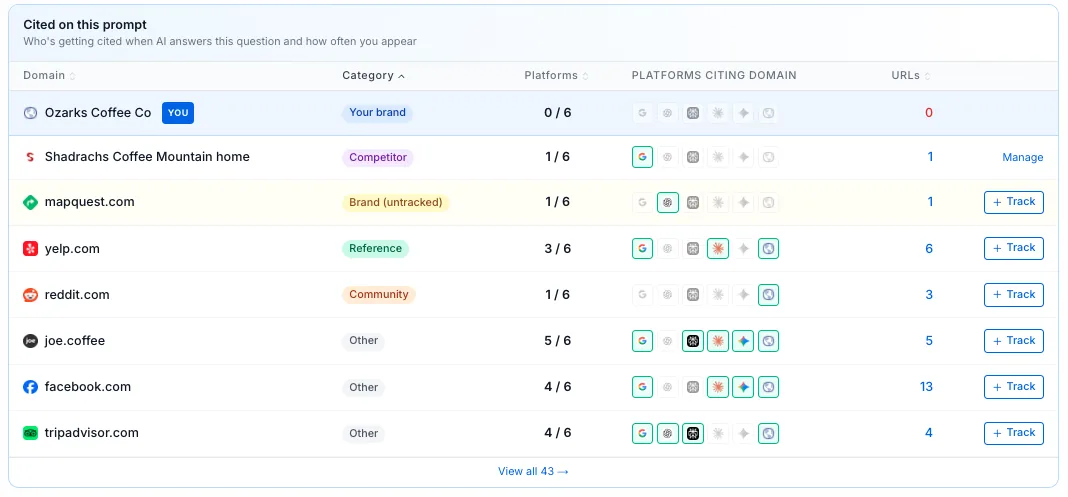
Click "See platform details" on any prompt and below the six platform cards is a new table. Every domain cited on this prompt, grouped by what it actually is.
Your brand is always pinned at the top in blue, even at zero. Below it, tracked competitors sit together in purple. Below those, yellow rows mark domains our classifier identified as brand-affiliated but that you have not added as competitors yet. Then reference sources (green), community sources like Reddit and Stack Exchange (orange), video (rose), and a catch-all "other" bucket (gray).
Default sort is by category, then within the competitor group by signal strength (most platforms first, then most URLs). Every column header is sortable. A faded chevron means "click to sort." A solid one means "active sort."
Reading a row takes about two seconds once you have done it twice. The domain and favicon tell you what was cited. The category pill tells you what kind of source it is. The Platforms count (for example, "4 / 6") tells you how broadly that domain dominates this question. Six small favicons show you exactly which AI platforms cited it (bright = cited, gray = not). The URL count is the number of distinct pages from that domain pulled into the answer, clickable to drill in. And the action column gives you a +Track button if it is not already a tracked competitor, or a Manage link if it is.
One deliberate exclusion: the leaderboard shows only URLs the AI actually cited in its answer. URLs the model considered but did not surface (sometimes called fanout sources) live on the existing /portal/citations page under a separate tab. They are a different signal. Conflating them would muddy both.
The + Track button
This is the small detail that buyers ask for and never get from competing tools.
If our domain classifier flagged something as "Brand (untracked)" (a yellow row), we already suspected it is a brand, and the +Track button is waiting. But that same button shows on Reference, Community, Video, and Other rows too, because misclassification happens. If AthenaHealth was flagged as a generic "Reference" on your account because the classifier had not seen them yet, you fix that with one click instead of going to /portal/competitors and adding them by hand.
Click it and four things happen, in this order. A POST goes to /api/competitors with a default name guessed from the domain (nextgen.com becomes "Nextgen"). The leaderboard re-fetches in the background. The row reclassifies to Competitor, picks up the purple pill, and exposes a Manage link. And the /portal/prompts list refreshes too, because the new competitor may affect your visibility math on other prompts.
Per-row spinner state means you can click +Track on five rows in five seconds and each one tracks independently. Rename the auto-generated competitor name on /portal/competitors later if you want to, or leave it.
The URL drilldown
Click the number in the URLs column on any leaderboard row. A new tab opens to /portal/citations/{domain} filtered to that one prompt, with a blue banner across the top showing the prompt text and a "Show all citations" link to clear the filter.
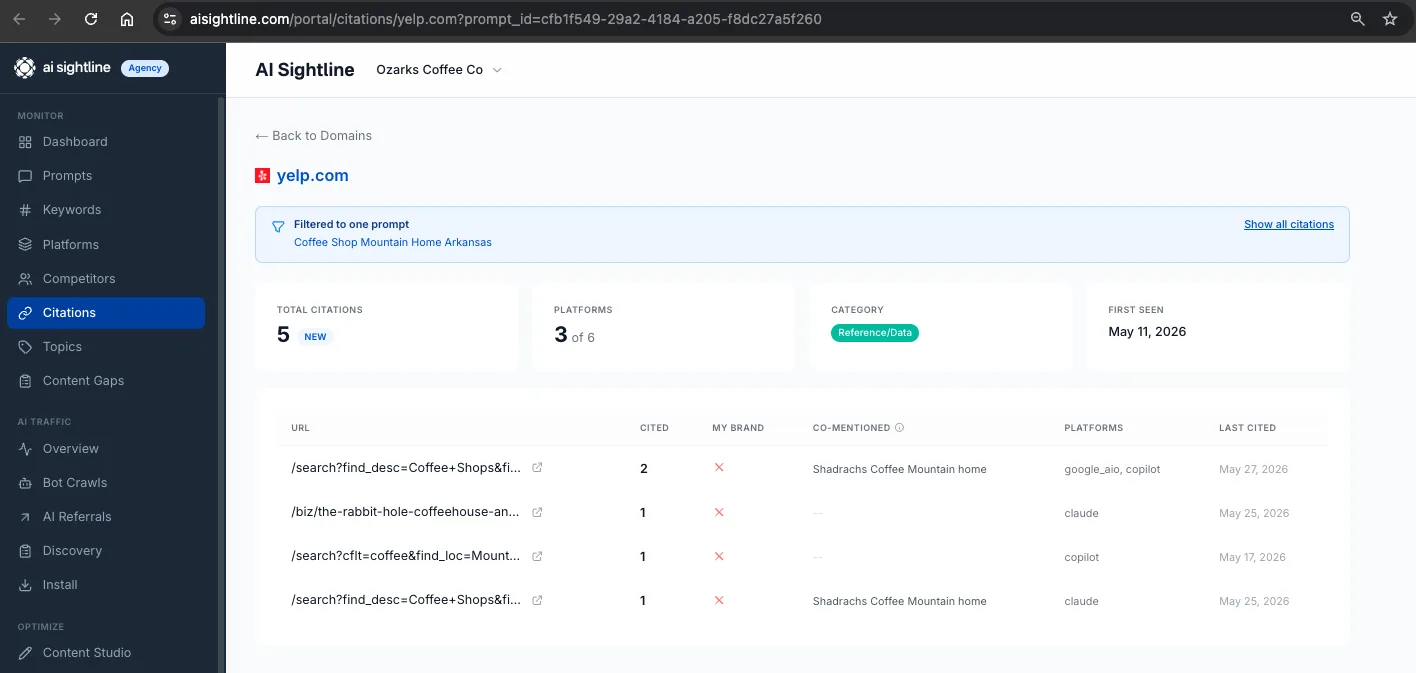
When prompt-scoped, the time range selector is hidden (irrelevant, you are looking at one prompt's lifetime), totals and the URL list are scoped to that prompt only, and the URL count on the destination page matches the count on the leaderboard exactly. If the leaderboard says NextGen has 4 URLs, the destination shows exactly those 4. No surprises, no discrepancies between the summary view and the detail view.
v1 REST API
Three endpoints, bearer-auth with your existing API key, rate-limit headers on every response.
List prompts with citation aggregation. A new include=citations parameter adds distinct_cited_domains and your_brand_cited to every prompt row. Cron this nightly, pipe to Slack, and you have a daily "prompts where I lost ground" digest with no dashboard babysitting required.
curl -H "Authorization: Bearer sk_live_..." \
  "https://aisightline.com/api/v1/prompts?brand_id={uuid}&include=citations"
Per-prompt competitor leaderboard. Returns the full payload the portal renders, ready to drop into a BI tool or a custom dashboard.
curl -H "Authorization: Bearer sk_live_..." \
  "https://aisightline.com/api/v1/prompts/{prompt-uuid}/citations"
Per-domain detail scoped to one prompt. The existing domain-detail endpoint now accepts a prompt_id parameter that narrows the response to that prompt's citations on that domain, mirroring the URL drilldown in the portal.
The full OpenAPI spec is at /docs/openapi.yaml.
MCP tool access
@aisightline/mcp-server@1.15.0 is on npm. If you have AI Sightline already configured in Claude, Cursor, Windsurf, or Claude Code via npx -y, you get the new tools automatically the next time the server boots.
The new dedicated tool is get_prompt_citation_leaderboard, lean and single-purpose:
Use the get_prompt_citation_leaderboard tool to show me who got cited on prompt abc-123.
Two existing tools were extended. get_prompt_results with a promptId now also returns the leaderboard, totals, and brand identity in the same call. manage_prompts action list with include_citations: true returns the same data the portal's citations column shows, in one cheap call. And get_domain_detail now accepts a promptId to scope its response to a single prompt's worth of citations on that domain.
The point of MCP parity is that the question "where am I losing across my tracked prompts and which competitor is winning each one?" should be answerable in plain English inside whichever AI assistant you already work in. It now is.
Three plays you can run today
Find the prompts you are losing. Go to /portal/prompts, click the Citations column header to sort ascending, optionally filter status to "Weak (1-2 citations)." The worst-performing prompts surface at the top. Pick one. The receipts are one click away.
Find competitors you have not been tracking. Open any prompt drilldown. Look for yellow "Brand (untracked)" rows in the leaderboard. Click +Track on every one you recognize. Within seconds, those domains move into your tracked competitor set and start informing your visibility and share-of-voice math on every prompt, not just this one.
Ask Claude about your competitive position. In any MCP-connected client (Claude Desktop, Cursor, Windsurf, Claude Code):
Use [My Brand Name] to list my prompts where I am not cited but at least three competitors are. Then drill into the top one and tell me who is winning.
That is one prompt. It runs across all your tracked prompts, finds the worst gap, drills into the leaderboard, and hands you a competitive briefing.
Here are eight prompts we'll actually use, ordered roughly easy to ambitious.
Yup, we at AI Sightline use our own tool for AI Search mgmt. Below are 8 prompts we're going to use in Claude Code via the MCP plug-in ASAP!
Drop any of these straight into Claude or any MCP-connected client with AI Sightline configured.
1. The Monday morning triage
Use [My Brand Name]. Show me every prompt where my brand is not cited but at least three other brands are. Sort by how many platforms cite competitors instead of me. Give me the top five with the leading competitor on each.
Five-minute read, tells you exactly where to spend the week.
2. Hidden competitor sweep
Use [My Brand Name]. Across all my tracked prompts, find every untracked brand domain that gets cited on three or more prompts. Tell me the domain, how many prompts mention it, and which platforms cite it most. Recommend which ones I should add as tracked competitors.
This is the one that finds the brands you didn't even know were beating you. Saves you the manual scan through every yellow row.
3. Pick a fight with one competitor
Use [My Brand Name]. Find every prompt where [Competitor X] is cited but I am not. For each one, tell me which specific [Competitor X] URL is getting cited, and across how many platforms. Group the results by [Competitor X] URL so I can see which of their pages is doing the most damage.
Now you have a target list of their pages to either outflank with better content or compete against directly.
4. The content brief generator
Use [My Brand Name]. Pick the prompt where I am losing the worst and the citation set looks weak (only one or two domains cited). Tell me the prompt text, who is cited, what URLs are cited, and then draft an outline for a blog post I could publish to displace them.
Combines competitive intel with content strategy in one move. Output is a brief you can hand to Dani.
5. Reddit and YouTube creep check
Use [My Brand Name]. Find every prompt where a Reddit, Quora, or YouTube URL is in the top three cited sources. For each one, tell me the specific community URL and what platforms are pulling from it. Then suggest whether I should engage in those threads or compete against them with my own content.
Community sources are weirdly powerful in AI answers and most people ignore them. This surfaces the ones that matter.
6. Platform-by-platform gap analysis
Use [My Brand Name]. For each of my tracked prompts, tell me which platforms cite my brand and which do not. Then identify the three prompts where the gap is most asymmetric: cited on one platform, absent on four or five. Those are my "almost there" prompts.
The "almost there" framing surfaces a different opportunity set than the "I am losing everywhere" prompts. Both deserve attention but the playbook is different.
7. Weekly delta digest
Use [My Brand Name]. Compare this week's citation leaderboards across my tracked prompts against last week. Surface any prompt where a new competitor appeared in the top three, any prompt where I dropped out of the cited set, and any prompt where the leading domain changed. Format as a brief I can read on my phone.
Set this one as a scheduled task and you have an automated Monday brief.
8. The "should I write this post" gut check
Use [My Brand Name]. I am thinking about writing a blog post titled "How to choose an EHR for solo practice." Find my tracked prompts that match this intent, show me who is currently cited on them, and tell me whether the citation set is strong (hard to displace) or weak (easy to displace). Recommend yes or no on writing it.
This one turns into a "should we write this?" advisor. Saves you from writing posts into already-won SERPs.
A bonus tip: any of these can be scheduled. If you save #1 or #7 as a recurring task ("every Monday at 6am"), you get the brief in your inbox without lifting a finger.
What is intentionally not in this release
Three deliberate omissions worth naming, because scope discipline is the difference between shipping in seven days and shipping in seven weeks.
No CSV export button on the leaderboard. The data is available via the API. If you want CSV, run the curl and pipe through jq into a file. A native export is in the queue and will land when the underlying export pipeline gets factored properly across the rest of the product.
No automatic competitor tracking. We flag brand-classified domains in yellow and put a one-click +Track button next to them, but we never auto-add competitors on your behalf. Tier limits exist. Spending them is your call, not ours.
No fanout sources in the per-prompt leaderboard. Fanout (the URLs the model considered but did not cite) is a different signal and lives on a different tab. Mixing them would make both worse.
The seven-day story
Now back to the question this post opened with. Why did this ship in seven days?
The honest answer is that we had been circling this feature for weeks. The mechanics (citation classification, domain leaderboard rendering, the +Track flow) were not new code. They were rearrangements of code that already shipped for the all-time /portal/citations view, the multi-brand pipeline, and the competitor management UI. What was missing was the scope decision: should we put competitive intelligence at the prompt level, or only at the brand level?
We had assumed brand-level was enough. Customers were not telling us it was not enough. They were asking adjacent questions that we kept routing into adjacent features. Then our customer asked the unadjacent question, in plain English, on May 20. By the end of that afternoon we had the PRD outlined. By Thursday the citations column was live in staging. By Friday the leaderboard rendered. The weekend went to the +Track flow and the API. Monday went to the MCP tool, the indexes, and a stress test against a brand with 8,000 citation rows. Tuesday morning it shipped.
Seven days from a customer ticket to a production release on every tier with REST API and MCP parity. We are not going to ship like that every week. Most product work is harder than this one was, because most product work involves new primitives, not rearrangements of existing ones. But when the question is the right question and the primitives are already there, this is the speed we hold ourselves to.
The reason is straightforward. AI Sightline is built by one founder and a small team in Mountain Home, Arkansas. We do not have the headcount to manage a quarterly roadmap committee. The customer asks. We listen. If the answer is yes and we can ship it without breaking the rest of the product, we ship it.
That is the product underneath the product. Per-prompt competitor visibility is the feature. Seven-day responsiveness is the company.
FAQ
Which AI platforms does per-prompt competitor tracking cover?
It covers all six platforms AI Sightline already tracks: Google AI Overviews, ChatGPT, Perplexity, Claude, Gemini, and Copilot. The platforms you see on the leaderboard are the ones your tier includes. Free sees 2 platforms, Starter sees 4, Pro sees 5, Business and Agency see all 6.
What is the difference between a tracked competitor and an untracked brand?
A tracked competitor is a domain you have explicitly added on /portal/competitors. AI Sightline weights its share-of-voice math and competitive reports around tracked competitors. An untracked brand is a domain our classifier identified as brand-affiliated but that you have not added yet. They show up in yellow on the leaderboard with a one-click +Track button so you can promote them in seconds.
How does the leaderboard handle URLs the AI considered but did not cite?
The per-prompt leaderboard shows only URLs the AI actually cited in its answer. URLs the model considered but did not surface (fanout sources) are a separate signal and live under the Fanout sources tab on /portal/citations. Keeping them separate prevents conflating retrieved URLs with cited URLs, which are very different signals for GEO strategy.
Is per-prompt competitor tracking available on the API?
Yes. Three v1 REST API surfaces ship with this release: GET /api/v1/prompts with include=citations adds citation aggregation to every prompt row, GET /api/v1/prompts/{id}/citations returns the full leaderboard payload, and the existing GET /api/v1/citations/domains/{domain} endpoint accepts a prompt_id query parameter to scope the response to one prompt. All require bearer-auth with your existing API key.
How fast is the leaderboard query at scale?
The per-prompt leaderboard returns in roughly 3 milliseconds on a prompt with 1,000+ citation rows, verified against production data. The /portal/prompts list endpoint with citation aggregation returns in roughly 15 milliseconds for a brand with 8,000+ citation rows. Two new database indexes turn the heavy queries into index-only scans, and the leaderboard aggregates server-side so even an Agency-tier brand with 5,000 citations per prompt transfers about 30 to 50 rows over the wire.
Can I ask Claude about my competitive position using this data?
Yes, via the AI Sightline MCP server. The dedicated get_prompt_citation_leaderboard tool returns the per-prompt competitive view in one call. Two existing tools (get_prompt_results and get_domain_detail) were extended to accept a promptId argument and return the same data. Configure once in Claude Desktop, Cursor, Windsurf, or Claude Code and you can ask competitive-intelligence questions in natural language.
Try it
Open /portal/prompts in your AI Sightline account. The Citations column is already there. Sort it ascending, click into the worst row, and look at the leaderboard. The first prompt you click on will tell you something about your competitive position you did not know yesterday.
If you do not have an account yet, the Free tier is the trial. Sign up at aisightline.com, connect your domain, and your first scan will populate the leaderboard within minutes.
Have a feature request? Email aisightline@gmail.com. We read every ticket. Sometimes we ship the answer the same week.
Show up where AI answers.
Get your free AI visibility score.
See how ChatGPT, Claude, Perplexity, Gemini, Google AIO, and Copilot talk about your brand.
Start freeSolo founder building AI visibility monitoring. Ships weekly. No venture capital, a lot of opinions about where AI search is going.